How to connect a turntable to speakers: powered, passive or Bluetooth
Which cable goes where depends on where your phono preamp is. You need exactly one between the needle and the speakers: with none, records play quiet and thin, and with two, they distort.
 By Douglas MatosoUpdated
Heads up: we earn a commission if you buy through our Amazon links, at no cost to you. It never decides our picks. Affiliate disclosure
The short answer
If your turntable has a PHONO/LINE switch, it has a preamp built in: set it to LINE and run the RCA cable into the input of a pair of powered speakers, or into an AUX or CD input on an amplifier. If it has no switch, add a phono preamp between the turntable and the speakers, or plug it into the PHONO input of a receiver. Passive speakers (no power cord) always need an amplifier or receiver in between. Whatever the setup, make sure the signal goes through exactly one phono preamp.
Side by side
| Your gear | Turntable switch | Plug the turntable into | Extra box you need |
|---|---|---|---|
| Turntable with a preamp + powered speakers | LINE | The RCA or AUX input on the powered speaker | None |
| Turntable without a preamp + powered speakers | No switch | A phono preamp, then the preamp into the speakers | Phono preamp, unless the speakers have a phono input |
| Receiver or amp with a PHONO input + passive speakers | PHONO | The PHONO input, plus the ground wire to the ground screw | None |
| Amp without a PHONO input + passive speakers | LINE | Any line input: AUX, CD, TAPE | Phono preamp, if the turntable has none |
| Passive speakers and no amp | Any | Nothing yet | An integrated amp or receiver |
| Bluetooth speaker or soundbar | LINE | The AUX or RCA input, or pair over Bluetooth | None with a Bluetooth turntable |
Start with the phono preamp
A turntable’s cartridge turns the groove into a tiny electrical signal, a few thousandths of a volt. Everything else you’d plug into a speaker, like a phone, a TV or a CD player, puts out what’s called line level, roughly a hundred times stronger.
Records are also cut with the bass turned down and the treble turned up, so the groove fits and surface noise drops when it’s undone. A phono preamp does both jobs: it boosts the signal to line level and restores the bass and treble. Skip it, and one Reddit reply sums up the result: “a very low level, very little bass, and way too much treble.”
So before you buy a cable, find out where your phono preamp is. There are four places it can be:
- In the turntable. Look on the back, or under the platter, for a switch marked PHONO/LINE (some say PREAMP ON/OFF or BYPASS). If it’s there, you have one. Most entry-level turntables do, including the AT-LP60X and Fluance RT81.
- In your receiver or amp. Look for an input labeled PHONO, usually next to a small ground screw.
- In your speakers. A few powered speakers have one, like the Kanto YU4, which has a phono setting on its RCA input. Most, including the Edifier R1280T and R1280DB, don’t.
- In a separate box. A small phono preamp that sits between the turntable and whatever comes next.
The signal should pass through exactly one of these. Most of the “my turntable sounds wrong” threads we read on Reddit came down to zero or two.
Powered speakers: the simplest setup
Powered speakers have an amplifier built in, and they plug into the wall. That’s how you tell them apart from passive speakers, which only take speaker wire. U-Turn, which makes turntables, puts it plainly: “if your speakers have an electrical plug then it’s safe to assume they’re powered.”
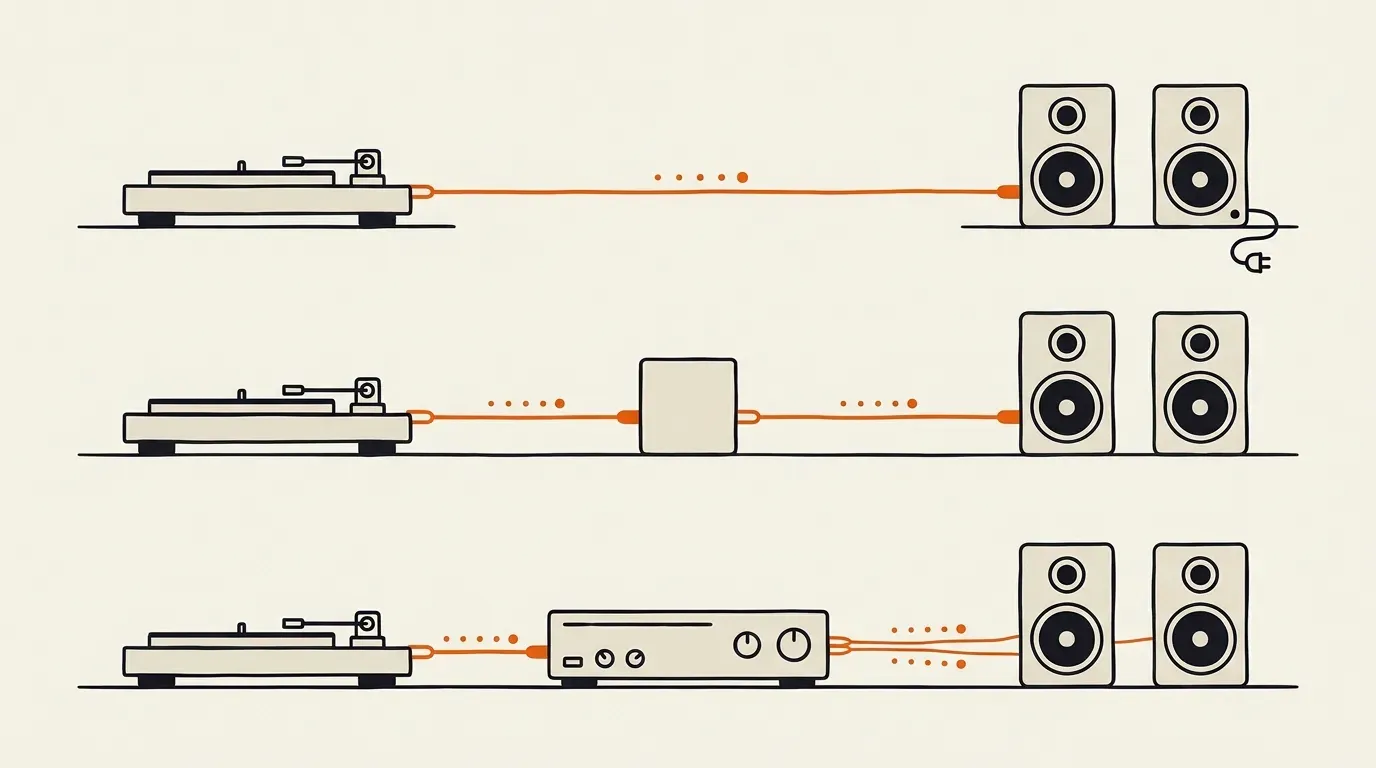
Top: a turntable with a built-in preamp goes straight into powered speakers. Middle: without one, a phono preamp sits in between. Bottom: passive speakers need an amplifier or receiver.
If your turntable has a built-in preamp
- Set the turntable’s switch to LINE.
- Run the RCA cable (red and white plugs) from the turntable’s output to the input on the powered speaker. If the speaker only has a 3.5 mm AUX jack, use an RCA-to-3.5 mm cable.
- Connect the two speakers with the cable that came with them, plug in the power and pick the right input on the speaker or remote.
On a home-audio pair, all the inputs are on one speaker, the one with the amplifier inside. One reader planned to run the left plug to the left speaker and the right plug to the right one, and a reply set them straight: “there will be a speaker output that connects to the second speaker.”
If your turntable has no preamp
Connect it to a phono preamp, connect the ground wire to the preamp’s ground screw, then run a second RCA cable from the preamp’s output to the speakers. If your speakers have a phono input, like the Kanto YU4, you can skip the separate box and use theirs.
Check for a volume knob
Home speakers like the Edifiers have one on the side or on a remote. Some studio monitors only have a gain knob on the back, which gets old fast. A phono preamp with its own volume knob solves that.
Passive speakers: add an amplifier
Passive speakers have no power cord and no amplifier, so a turntable can’t drive them on its own, preamp or not. In a 2025 r/turntables thread, a reader asked how to hook a Fluance RT81 straight to a pair of Polk ES20s. Every reply said the same thing: “you will need a receiver or amp.” A receiver is an integrated amp with a radio tuner, and either works.
If the amp or receiver has a PHONO input
- Set the turntable’s switch to PHONO, or to bypass, so its own preamp is off.
- Plug the RCA cable into the PHONO input.
- Connect the turntable’s ground wire to the ground screw next to it.
- Wire the speakers to the amp with speaker wire, red to red and black to black.
If it has no PHONO input
Set the turntable to LINE and plug it into any other input, like AUX, CD or TAPE. If the turntable has no preamp, put a phono preamp in between.
If you’re still choosing between the two kinds of speakers, our active vs passive speakers explainer covers the trade-offs.
Bluetooth speakers and soundbars
Many speakers and soundbars have an AUX or RCA input. Use a turntable with a built-in preamp, set it to LINE and plug it in like you would with powered speakers.
If the speaker or soundbar has no analog input, you have two options. A Bluetooth turntable, like the AT-LP60XBT, pairs with it directly. Or, for a soundbar with only optical and HDMI inputs, you can add a small analog-to-optical converter between the turntable and the soundbar. Some guides call that box a DAC, but a DAC converts the other way, so check the listing says analog in, optical out.
Bluetooth costs some sound quality, and soundbars are built for dialogue more than music. For a starter setup that’s often a fair trade.
When it sounds wrong: what owners run into
Very quiet, thin or tinny
There’s no phono preamp in the chain. The usual causes are a turntable switched to PHONO and plugged into a line input, or a vintage turntable with no preamp at all. One owner’s Garrard played very quietly through an amplifier that was fine with CDs. The top reply: “If your turntable doesn’t have a built-in preamp, which almost no vintage player does, and your amp doesn’t have a phono in, then you have to run the signal through an external phono preamp.” Another owner found a gifted DJ turntable much quieter than their other one through the same Edifier R1280Ts, for the same reason.
Loud, harsh or distorted
There are two phono preamps in the chain. A turntable set to LINE and plugged into a PHONO input is the classic case. One new owner’s setup distorted on every record until a commenter pointed at the switch: “It has a built in phono pre amp and if you have it on and connected to a phono input it’s doubling the amp.” The same thing happens with a separate preamp plugged into the receiver’s PHONO input. A reader who upgraded to a Pro-Ject with an external preamp got buzzing and distortion until they moved it to a line input.
Humming or buzzing
Connect the ground wire, if your turntable has one, to the box that holds the phono preamp. Owners with separate preamps hear hum more often, because the turntable and the preamp are two boxes. In one thread, a Technics SL-BD210 owner had hum through a cheap phono preamp but not without it, and the first reply was “you WILL need a grounding cable between the SL-BD210 and the Microphono, otherwise it will hum.” With the turntable’s built-in preamp, the ground is handled inside, so hum there more often comes from a loose cable or from signal cables running alongside power cords.
Sound from only one speaker
Swap the left and right plugs at one end. If the silent side moves, the problem is the turntable or its cable. If it stays, it’s the preamp, the speakers or the cable between them.
No sound at all
Check that the turntable is in an input, not an output. One AT-LP60X owner plugged it into a stereo’s speaker output sockets, and a commenter suspected that sent the turntable’s preamp far more voltage than it was built for. Then check the input selector on the speakers or receiver, and the PHONO/LINE switch.
Skipping or a low howl at high volume
The speakers are on the same shelf as the turntable, and the needle is picking up their vibration. Move them to separate shelves or stands. Our powered speakers guide has more on placement.
The easiest setup if you’re starting from scratch
A turntable with a built-in preamp and a pair of powered speakers. It’s two boxes and one cable, and there’s no ground wire or receiver to deal with. You can still add a separate phono preamp later: set the turntable to PHONO and put the preamp in between. Our turntable picks for beginners note which models have a preamp built in, and our powered speakers guide notes which speakers have a phono input.
Ready to pick one?


Questions beginners ask
How do you set up a turntable for the first time?
Put it on a steady, level surface, on a different shelf from the speakers so their vibration doesn't reach the needle. Then connect it using the table above. An automatic turntable like the AT-LP60X needs nothing else. A manual one like the AT-LP120XUSB also needs its tonearm balanced with the counterweight and the anti-skate set, following the manual. One owner forgot the counterweight after setting anti-skate, and the arm swung away until they fixed it.
Do I need a preamp for my turntable?
You need one phono preamp somewhere in the chain. It can be built into the turntable (look for a PHONO/LINE switch), built into your receiver or amp (look for an input labeled PHONO), built into the speakers (a few, like the Kanto YU4, have one), or a separate box. If none of those has one, buy a phono preamp. If more than one does, switch the extras off.
Phono vs line, which setting do I use?
It depends on what comes next in the chain. Use LINE when the turntable plugs into powered speakers, a Bluetooth speaker, a soundbar or an amp input marked AUX, CD or LINE: the turntable's own preamp does the boosting. Use PHONO when it plugs into a PHONO input or a separate phono preamp, so the signal isn't boosted twice. Records that play quiet and thin usually mean PHONO into a line input; harsh distortion usually means LINE into a PHONO input.
Can you connect a turntable directly to speakers?
To powered speakers, yes, as long as the turntable has a built-in preamp switched to LINE. To passive speakers, no. They have no amplifier, so they need a receiver or integrated amp between them and the turntable.
How do you ground a turntable?
Connect the thin wire with a spade or fork end to the ground screw on whichever box holds the phono preamp: the receiver with the PHONO input, or the separate phono preamp. Loosen the screw, slide the wire under it and tighten it. If you use the turntable's own preamp, the grounding happens inside the turntable, so you can usually leave the wire off. Connect it only if you hear hum.
How do I connect a turntable to a soundbar?
Use a turntable with a built-in preamp set to LINE and plug it into the soundbar's AUX or RCA input. If the soundbar only has HDMI and optical inputs, either pair a Bluetooth turntable with the soundbar, or add an analog-to-optical converter. A DAC won't work, because it converts the other way.
Why does my turntable sound so quiet through my speakers?
Almost always, nothing in the chain is boosting the phono signal. Check that the turntable's switch is on LINE, or that it's plugged into a PHONO input. Many vintage turntables have no preamp, so they need a separate one. Vinyl also plays a little quieter than a phone over Bluetooth, so some extra volume is normal.
How do I connect an old turntable to new speakers?
Most turntables from before the 2000s have no built-in preamp, because every receiver of the era had a PHONO input. Put a phono preamp between the turntable and powered speakers or an amp's line input, and connect the ground wire to the preamp.
Can I use an RCA-to-3.5 mm cable?
Yes. If your speakers have a 3.5 mm AUX jack instead of RCA inputs, a cable with two RCA plugs on one end and a 3.5 mm plug on the other works fine. The AT-LP60X comes with one.