XLR vs USB microphone: which one should you start with?
Most comparisons boil it down to convenience against quality. But a USB mic is just a mic with a small interface built in, so what really decides it is how many people you'll record and whether you'll want to swap parts later.
 By Douglas MatosoUpdated
Heads up: we earn a commission if you buy through our Amazon links, at no cost to you. It never decides our picks. Affiliate disclosure
The short answer
Buy a USB mic if you'll record one voice at a time on a computer and want to plug in and start. Buy an XLR mic and an audio interface if two people will record in the same room, you'll also record an instrument, or you want to upgrade the mic and the interface separately later. At beginner prices the sound difference is small. If you can't decide, a mic with both outputs, like the Samson Q2U or Shure MV7+, lets you start on USB and move to XLR later.
Side by side
| USB | XLR | |
|---|---|---|
| What's inside | Mic, preamp and converter in one body | Just the mic. The preamp and converter live in your interface |
| What else you need | Nothing but a computer, tablet or phone | An audio interface or mixer, plus an XLR cable |
| Setup | Plug in one cable | Mic to interface, interface to computer |
| Two mics in one room | Awkward: computers don't like two USB mics at once | Easy with a two-input interface |
| Upgrading | Replace the whole mic | Swap the mic or the interface on its own |
| Works with mixers, recorders, PA | No | Yes, it's the standard plug |
| Sound at beginner prices | Close; the mic and the room matter more | Close; more mics to choose from |
| Examples | Audio-Technica AT2020USB-X, Blue Yeti | Audio-Technica AT2020, Shure SM58, RØDE PodMic |
A USB mic has the interface built in
Every microphone puts out a small analog signal. Before your computer can record it, two things have to happen: a preamp raises it to a usable level, and a converter turns it into digital audio. Those two parts can sit inside the mic or in a separate box.
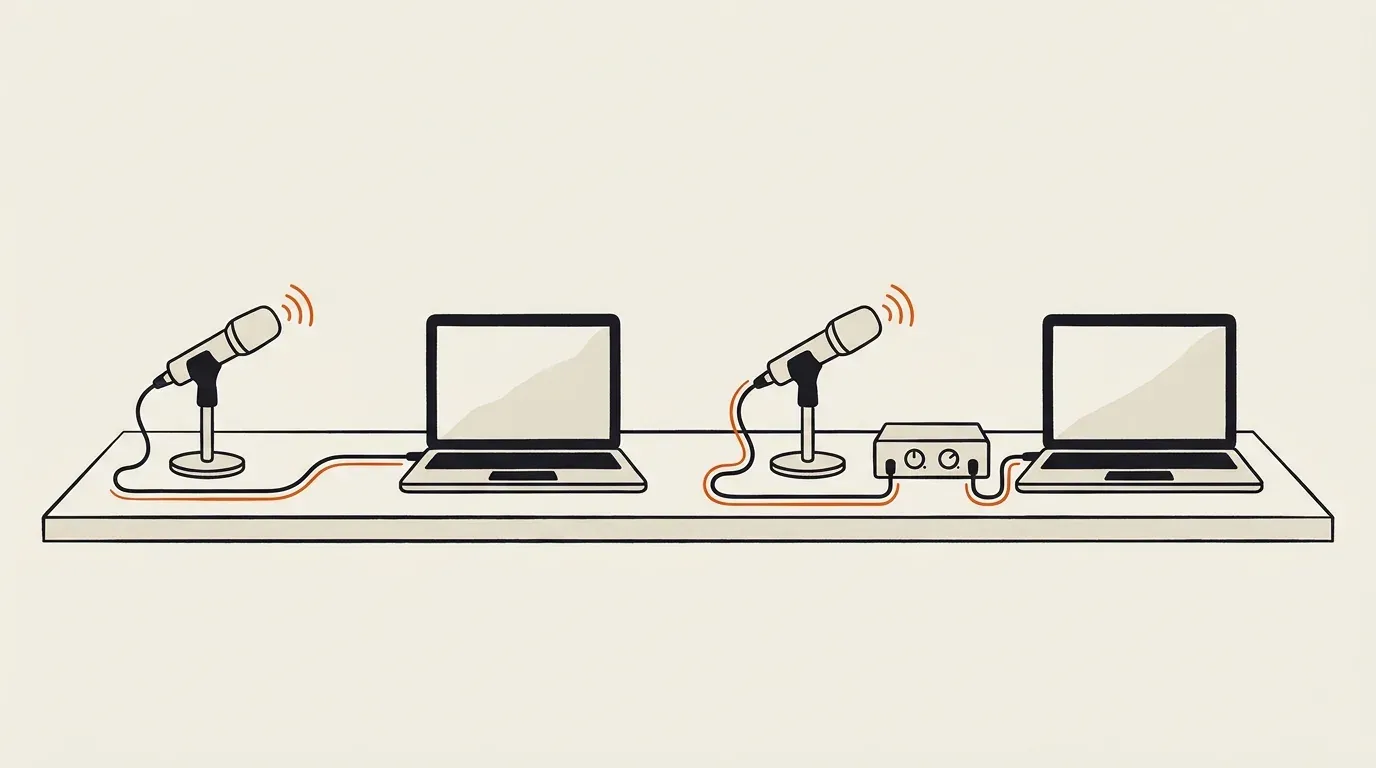
USB (left): the preamp and converter are inside the mic, so one cable goes to the computer. XLR (right): they’re in a separate interface, and the mic only sends an analog signal.
In a USB mic, both are built in. That’s why one cable is enough, and why most USB mics also have a headphone jack and a volume knob: they’re a mic and a small one-input audio interface in one body. RØDE calls them “very much an ‘all-in-one’ recording solution.”
An XLR mic has neither. XLR is just the round three-pin plug that recording, stage and broadcast gear has used for decades. The mic sends an analog signal down the cable, and an audio interface or mixer does the preamp and converter work. In return, that signal plugs into almost anything: an interface, a mixer, a PA at a gig, a field recorder.
One Reddit reply sums it up: to get audio into a computer “you always need two things, a mic, and an interface.” With a USB mic you buy both in one body.
Does XLR sound better?
Not because of the plug. Some excellent mics are USB, and some poor ones are XLR. What changes the sound is the mic itself, the room, and, a long way behind, the quality of the preamp and converter.
At beginner prices, the owners we read mostly find the difference small. A podcaster on r/podcasting says they’ve run blind tests and “no one can conclusively pick out whether a mic is usb or XLR.” In a thread about a Yeti Pro, which has both outputs, the most useful reply says running it through a budget interface instead of its own USB would be “so unnoticeable that it’s probably not worth spending money on it.” A voice actor compared a Blue Yeti against an RE20 on studio monitors and found that after EQ and editing, “the difference was negligible.”
Others hear a clear step up. One podcaster who moved to a Shure MV7 over XLR noticed the clarity and lower background noise “right away.” But a move like that usually changes the mic too, and often from a condenser to a dynamic, which on its own keeps out more of the room. More on that in our condenser vs dynamic explainer.
Where XLR does help the sound is choice. Most mid-range and high-end studio mics come only with XLR, so if you’ll want a particular vocal mic one day, you’ll need an interface for it.
If your recordings sound echoey or noisy, look at the room before you change the connection. The top answer in one thread about switching tells the asker to “put that money into treating your room first.” Our free mic test shows how much room noise your current mic picks up.
Two people, one computer: where USB gets awkward
Owners bring this up more than anything else, and for podcasters it should settle the question.
Two USB mics plugged into one computer show up as two separate audio devices, each with its own converter and its own settings. As one podcaster puts it, “Recording into one computer with two USB mics just doesn’t work,” and another adds that “Computers often glitch if there are two USB mics attached.” Some makers work around it with their own software (RØDE Connect handles several RØDE USB mics) or with a recorder made for it, but it’s never as simple as a single interface.
With XLR, two people means two mics and a two-input interface. Each voice lands on its own track, which one owner says “makes editing easier,” because you can fix one person’s level or cough without touching the other. RØDE and Elgato both say the same thing: more than one mic in the room is XLR territory.
If each person records on their own, a USB mic is fine. One host on r/podcasting went the other way, from XLR to USB, because every co-host records solo and the XLR chain had covered the desk. So count the people who will sit in the room with you. A guest who joins remotely records on their own end.
The same goes for recording yourself singing and playing guitar at once. A USB mic is one input. An interface with two inputs takes the mic and the guitar.
What an XLR setup actually needs
An XLR setup has three parts:
- The mic.
- An audio interface or mixer, which also gives you a gain knob, a headphone jack and, on almost every model, 48V phantom power for condenser mics. Our audio interface picks list the inputs and gain each one has.
- An XLR cable for each mic. Owners asking about this keep finding the same thing: neither the mic nor the interface usually comes with one. You don’t need an expensive cable. The interface’s USB cable to the computer is normally in its box.
Watch the gain with quiet dynamic mics. Shure says the SM7B wants at least 60 dB of gain, and one voice actor who moved from a Blue Yeti to an SM7B on an older Scarlett Solo found it “quiet” and “literally no better than my Yeti.” Pick an interface with enough clean gain, like the Scarlett 2i2 4th Gen at up to 69 dB, or a mic that needs less.
Setup is the main cost of XLR in time, but it’s a one-time job. Once the interface is in place, swapping or adding mics is just a cable.
Hearing yourself while you record
Both kinds can let you hear yourself with no delay, which matters most for singing. Many USB mics, like the AT2020USB-X, have a headphone jack on the mic with a mix knob that blends your voice with the computer’s playback. Audio interfaces do the same with direct monitoring. Check for a headphone jack before buying a USB mic. Without one, you hear yourself through the computer, and the slight delay makes it hard to sing in time.
On hybrid mics, the jack and the controls usually work over USB only. Owners of the Samson Q2U note that its headphone jack does nothing in XLR mode, and the FIFINE AM8’s gain knob, jack and mute are USB-only too. Over XLR, your interface does those jobs.
Upgrading later
With USB, the mic and the interface are one product. If you want a better mic, you replace both, and if the USB port fails, the whole mic goes with it. With XLR, you can keep a good interface and change the mic, or keep the mic and buy a better interface. Several owners compare it to a laptop against a desktop PC you can open up.
XLR mics also last across setups. Elgato points out that “an XLR mic from twenty years ago still works with a modern interface,” and one Reddit commenter sings in a cover band on Friday and uses the same mic on a podcast the next day.
XLR to USB adapters
You’ll see small adapters that plug onto an XLR mic and end in a USB cable. These work because they hide a preamp and converter inside, so they’re really a tiny one-input interface. Better ones give you gain, a headphone jack and phantom power: Shure’s MVX2U Gen 2 offers 60 dB of gain and 48V phantom power. Cheaper cables vary a lot, and some skip phantom power or gain control, so check before you buy for a condenser or a quiet dynamic.
A plain wire can’t do this job, because USB carries digital audio and XLR carries analog. Without a converter inside, there’s nothing to turn one into the other. One commenter adds a warning: don’t buy a DMX cable by mistake. DMX lighting cables use XLR-style plugs but aren’t made for mics.
The reverse doesn’t work either. A USB-only mic can’t plug into an XLR input, because there’s no analog signal left to send.
Mics with both outputs
A growing number of mics have a USB port and an XLR jack, and they take most of the pressure off the choice. You start by plugging into your laptop, and if you add a co-host or an interface later, you switch to the XLR side and keep the same mic.
Owners pick these on purpose. “USB now, XLR later” is a reason several Shure MV7+ owners give for buying it, and the founder of the School of Podcasting names “mics that do both,” the Samson Q2U and RØDE PodMic USB, as their favorites on r/podcasting. All of the picks in our podcast microphone guide except the RØDE PodMic have both outputs.
Check the box before you count on the XLR side. The Q2U comes with both cables, while the MV7+ and the AM8 come with only a USB cable.
Which one should you buy?
Solo podcasting, streaming, YouTube and calls
USB, or a mic with both outputs. You’re one voice on one computer, and a USB mic with a headphone jack does everything you need. Pick a dynamic one if your room is noisy, and see our podcast microphone picks.
Two or more people in the same room
XLR mics and an interface with an input for each person. It’s the setup owners keep recommending, and it gives you a separate track per voice.
Singing, or singing while you play
XLR, unless you only want quick demos. You’ll want an interface with two inputs to record a vocal and a guitar together, and most of the picks in our vocal microphone guide are XLR. If you only sing over backing tracks, a USB mic with zero-latency monitoring works.
You already own an audio interface
XLR. Several owners in the threads we read make the same point: there’s no reason to pay for a second preamp and converter built into a mic when you already have them.
Not sure yet?
Get a dynamic mic with both USB and XLR, like the Samson Q2U. It works on a laptop out of the box, comes with both cables, and moves to an interface if your setup grows.
Ready to pick one?


Questions beginners ask
Do XLR mics sound better than USB mics?
Not because of the plug. A USB mic has its preamp and converter built in, and an XLR mic uses the ones in your interface. At beginner prices, owners who have compared them mostly call the difference small. One podcaster on Reddit says blind listeners couldn't pick out which mic was USB. The bigger gap is at the high end, where most studio mics are XLR only, and in your room, which matters more than either.
Should I get a USB or XLR mic for podcasting?
If you host alone or your guests join remotely, USB is fine and simpler. If two people sit in the same room, go XLR: each person gets a mic, both go into a two-input interface, and each voice lands on its own track for editing. A mic with both outputs, like the Samson Q2U, covers you either way.
Can a USB mic be converted to XLR?
Only if it was built with an XLR output too. Mics like the Samson Q2U, FIFINE AM8, Shure MV7+ and RØDE NT1 5th Gen have both. A USB-only mic like the AT2020USB-X sends a digital signal, and no cable turns that back into the analog signal an XLR input expects.
Can I plug an XLR mic into my computer with an XLR to USB cable?
Yes, if the cable has a converter built in. Those adapters are really a tiny one-input interface, and the better ones have gain, a headphone jack and 48V phantom power. Shure's MVX2U Gen 2, for example, gives 60 dB of gain and phantom power. A plain cable with an XLR plug on one end and USB on the other can't work, and the XLR-style DMX cables sold for stage lights won't either.
Do all microphones use XLR?
Most microphones made for recording, stage and broadcast do, which is why an XLR mic from decades ago still works with a new interface. Consumer mics also come with USB, a 3.5 mm plug for cameras and phones, or a wireless link. Headsets and webcams have their own.
Is a USB mic good enough for singing?
For demos and covers at home, yes, as long as you can hear yourself without delay through the mic's headphone jack. Singers usually go XLR once they want to record vocals and an instrument at the same time, or want a better mic than the USB range offers. Our vocal mic guide has both kinds.
Do I need an XLR cable for a USB/XLR mic?
Only for the XLR side. The Samson Q2U comes with both cables, but the Shure MV7+ and FIFINE AM8 come with only a USB cable. XLR mics and interfaces almost never include an XLR cable, so plan on buying one per mic.